You are currently not logged into ManagerLeague
If you wish to log in, click here.
If you wish to sign up and join us, click here.
Top Image
how to fit being a admin in ML into your life (26/10/2006 22:19)
Hi all,

I know i'm not a big writer om my blog and to be honest finding the time to do anything in here but admin duties has been hard
A lot of things have been going on outside of Managerleague and have pressed me for time
(thank god its cooling down a bit now)

I changed my job from being a incasso manager to being a shipping manager for DHL
and my hours went up from 40 to 55 a week .........
in the weekend i'd have to re-introduce myself to my GFand take care of my admins duties.
(hunting cheats, taking care off support cases and just generaly irritate other admins)

as you can see there is something missing from this story, 8 hours of sleep a day
yes i know sleep is overrated, but i personaly like to have my 8 hours and generaly i didnt get it past 6.5

so it was time for some action and i took this story to my boss
(who in all her wisedom blocked all internet access to our internal network)
and a funny thing happend

1) i found out my manager likes the game aswell
2) i now have internet at work
(me waves to the boss)(not spinner)

next i needed to sort the home problem with being online to much and i knew the GF problem would a hard nut to crack
So, i showed her how torrents work,
one week later our server was filled with seasons of grays anatomy, gillmore girls, 3 reality soaps and NCIS.....
almost 40gigs worth
but as a result she is now sitting two meters away behind her own screen enjoying her shows and giving me time to write this all down.

so i now have a better setup and it looked like i might even make that 8 hours a night goal

what happens......

Spinner gets a eyepatch (he says for the pain, but i think he just wanted to put a picture like that on the frontpage!)
making me login WAY more to see what you guys broke now

I just spoke to him by phone and when he gets behind a computer or for that matter gets any light in that eye it feels like a hot poker gets put in it......
does that mean he doesnt login.....nope (
like pain do we...?)
it means he now spends his days trying to find ways to do it all without pain.
i would say rest is the best solution, but who am i to speak

anyway, he told me he is getting better and will be back as soon as possible

writing all this i now find that i ****at writing a ending to this all so i'll just wave

Read the full entry
I wrote my first book (31/07/2006 00:11)
I have been working on my first book
anyone want to order a copie please contact me on my e-mail

Read the full entry
mIRC Guide (08/07/2006 14:44)
Welcome to our mIRC Guide
This guide will get you started on mIRC a widely used program used to chat on IRC
This is the chat system we have in the game and you might not be aware of it
if your not aware of it you can open it on our frontpage
go to the communication in the linkbar and select chat!

Now, if you like what you see, i think you will like mIRC and i invite you to continue


Why use mIRC to chat


First off i would like to tell you a bit about mIRC.
mIRC is a client to chat to other people online.
There are a lot of IRC networks out there and those usualy hold a lot of channels.
In those channels you can chat with everyone in there and also have private conversations aswell.

Now i can hear you think, why would i use yet a other chat program........
let me tell you
  1. Managerleague has a channel on it that you can use to find new friend, play friendly's with and just generaly have fun
  2. The client is very user friendly and alowes you to store a lot of stuff automaticly
  3. Its free, not only of you having to pay but also free of spyware or other stuff no-one wants but some people still make 
  4. did i mention our channel yet
Back   Next


Installing mIRC


First off you need to download the mIRC Client
you can do that here

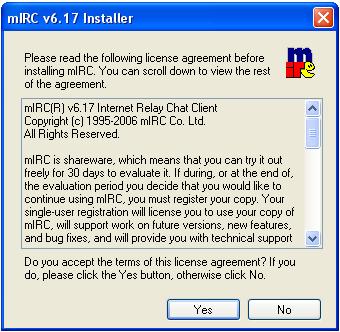
when downloaded run the file to install it and get the following steps


Press Next

If you agree with the user agreement press yes

Select the place you wanne install it and press install

mIRC will now install

When done you get this window
Select both "Read mIRC Help file" and "Launch mIRC"

Press Finish and mIRC will lauch

When mIRC is installed you also het a page with links on them
Use them to start up mIRC by making a copy of the mIRC link to your desktop.

The readme file will tell you the latest changes,
but you dont read it to have mIRC work. it might help you tho

Back   Next


Setting up mIRC


starting up mirc requires you to set up the network you want and your personal details
Also you need a online nickname, you could ofc use your manager name but you dont have to
Nicks can be used by everyone and if you want to make sure no-one else can use your nickname you can register it on the netgamers website


When mIRC starts up for the first time you get this window.
Ofc you can register if you want to but if you dont the client will keep working.
It will just let you wait a couple of seconds every time you start it up

by pressing continue you end up in the setup part of mIRC

please do that now, it will take you to the next wondow


The "Connect"option under Category should be automaticly selected,
if not select it now.

 You now get to fill in your details

Full Name : you can fill in your name here

(but no-one will shoot you if you dont awnser truthfull)
E-mail : you CAN enter your E-mail here
(again, feel free to make one up if you dont want it public)
Nickname : here you enter your nickname

Alternative : if your nick is already in use the                         
alternative will be used.

all the other options you can leave as they are
we are getting to it later in this guide

please select "Servers" under Category


This is the part where you select the IRC network you wanne use.
ofc its your choise where you go, but if you wanne find us please select "Netgamers: Random server"from the IRC server list

leave all the other options blank for now


Please select "Options" under Category


This will setup your mIRC options.

leave the checked options on untill you are up and running, then deside if you need them or not.

Connect on startup : if you check this box you will be connected as soon as mirc starts, this means you cant change your nick before going online so its up to you if you want it.

Reconnect on disconnection : if your internet cuts out and comes back on you will be auto reconnected, the downside is that if you leave mIRC on when not at your PC you might be hopping around and get baned.

you need to desided if you wanne use those options.

next press perform and set the automated options.
Perform is where you can enter command you want mIRC to do on connection
Like logging in your nickname (if you registered)

click the box "Enable Perform on connect"

to login enter /msg p@cservice.netgamers.org login <nickname> <Password>
this is NOT your ML login!!!!

to get into our channel automatic when connected put in.
/join #managerleague

press "ok" when done


Also press "ok" on the mIRC Options box


Back   Next


Startup and the basic commands


now that you have setup Mirc you can connect mIRC to the network
this is very simply done by pressing the lightning button in the upper left courner

If you want to make changes to the options we just setup press the folder/hammer button and the options window will re-appear

i will now give you a list of the most used commands

- /join #<channelname>
this will make you join a new channel, its not gonna close the old one, you will just get 2 windows
- /msg <nickname> text
this will send the text part to the person you entered the nick off in the command
you can also double click on the name in the nicklist in channel, then you enter a private chat
- /me text
this will give you a line that looks like a 3rd party command
in my case "/me trows a ball" would come out as "Xontas trows a ball"

if you want to see all commands, click here
any questions feel free to ask me
Xontas@managerleague.com

thanks for reading


Back
Read the full entry
Funny pictures (04/07/2006 23:02)
Some of you might know this Feeling
                            (hi mr Phil)                                
A Very Cool table
A very relaxed dude ;)
My home system
(GF laughing in the background)
Just very very cool
Read the full entry
Who am i (and do you realy wanne know?) (04/07/2006 22:41)


Hi all and welcome to my blog

Most of you know me as Xontas but i think its time to introduce myself to you guys!

First off my name, its Arno. I am 31 years old and come from Holland.
Some of you might know me from my Planetarion day, but thats all history now.

I ended up as a admin in Managerleague because spinner and I have worked on Planetarion togheter (he boss, me peon) and he needed some helping hands.
Something that is actualy very funny because i dont know a thing about football .

I do a couple of things for you in this game, support requests, multihunting, the IRC channel (#managerleague on irc.netgamers.org), payments and general other stuff as it pops up.
If you need me

you can  find me on IRC most of the time (irc.netgamers.org   channel #managerleague)

Also you can contact me by mail Xontas@managerleague.com .
i check my e-mail just about daily.

Also you can use the support system and one of the admins of Managerleague will pick it up.
If for some strange reason you realy need me, ask for me in the body of your questionen.


This Blog

I will fill this blog with a lot of funny stuff but also with guides to usefull this to use in Managerleague or in general
please enjoy


Read the full entry